Menu

Plugins worpress untuk adsense

Berikut beberapa plugins yang mungkin anda cari untuk untuk memasang adsense di worpess anda

1.Author Adsense MU Plugin.
Plugin yg satu ini untuk kalangan wordpress MU ( Multi User ) Edition.Anda silahkan download di: http://www.harleyquine.com/php-scripts/author-adsense-adsense-mu-plugin/
2.Adsense Sharing Revenue and Earnings System.
Plugin tentang pembagian uang yg sama dengan Author Adsense.Namun terdapat kemampuan untuk meliha jumlah pendapatan langsung wordpress.Plugin ini bisa di download di: http://adsense.ayanet.com/
3.Adsense Beautifier.
Peletakan gambar dlm iklan Adsense memang diperbolehkan oleh google beberapa waktu yg lalu,ini sangat membantu kita untuk meningkatkan jumlah CTR ( Click Throug Rate ).Namun sekarang ini gambar sudah tidak boleh diletakan bersamaan/berdampingan dengan iklan adsense walaupun sudah ada jarak pemisah.Coba di: http://www.supriyadisw.net/2006/07/adsense-beautifier/
4.WP AdsenseProfit.
Plugin untuk wordpress yg memungkinkan kita menerima hasil laporan earning langsung lewat wordpress,coba di: http://www.abuzant.com/2006/07/10/wp-adsenseprofit.html
5.Adsense Inline.
Penambahan iklan adsense dalam postingan wordpress menjadi semakin mudah dengan bantuan Adsense Inline.Coba plugin menarik ini di: http://philhord.com/phord/adsense-inline-with-wordpress-blog-posts/
READ MORE - Plugins worpress untuk adsense

Complete Price List New HP 2012 Android

Android is the operating system for mobile phones based on Linux. Android provides an open platform to developers for creating their own applications for use by a variety of mobile devices.

And now I'll tell you about the latest android phone price list in 2012 in Indonesia, you may wish to purchase. Do not forget before you buy should be able to ensure the specifications and the price you buy android that will surely fit your needs.

Full Price List Latest Android HP 2012
1. Google Nexus One

Google Nexus One
Spec Google Nexus One :
CENTRAL PROCESSING UNIT : 1 GHz Scorpion processor, Adreno 200 GPU, Qualcomm QSD8250 Snapdragon chipset
Layar : AMOLED capacitive touchscreen, 16M colors, 480 x 800 pixels, 3.7 inche
Memory : 512MB RAM, 512MB ROM, Extended memory Hingga 32GB
Kekuatan baterai : Hingga 290 jam dan 10 jam waktu bicara.

Harga Google Nexus One : Rp.3.500.000,-


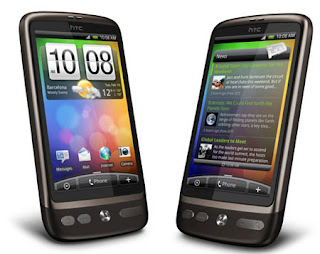
2. HTC Desire
HTC Desire
Spesifikasi HTC Desire :
CENTRAL PROCESSING UNIT : 1 GHz Scorpion processor, Adreno 200 GPU, Qualcomm QSD8250 Snapdragon chipset
Layar : AMOLED or SLCD capacitive touchscreen, 16M colors, 480 x 800 pixels, 3.7 inches
Memory : 576 MB RAM; 512 MB ROM, extended memory Hingga 32 GB
Kekuatan baterai : 340 jam and 7 jam waktu bicara.

Harga HTC Desire : Rp.2.800.000,-


READ MORE - Complete Price List New HP 2012 Android

business opportunities online in 2012

If you want to start doing business in the year 2012, you should start looking around and researching, 2012 business opportunities such as whether it would be a promising trend and profit.
There are other types of business from year to year has not subsided, and even tends to increase. Here is a 2012 business opportunities are expected to be a trend and one of these opportunities you can take to become a business in 2012.
1. Online business
The digital age has made it easier person to get all their needs. With just one "click", the desired goods will be delivered to the house. Convenience of shopping online is what makes online business continues to grow.

2. Culinary business


READ MORE - business opportunities online in 2012

Cara Jailbreak iPad 2 Dan iPhone 4S Dengan iOS 5.0


Jika anda tidak tahu cara melakukan jailbreak untuk iPhone 4S dan iPad 2 dengan iOS 5.0, maka kali ini kami akan menjelaskan langkah-langkahnya secara rinci. Perlu diketahui, dengan menggunakan tools yang baru dirilis untuk menjaibreak perangkat iPhone 4S dan iPad 2 ini, anda tidak perlu khawatir harus melakukan jailbreak ulang ketika reboot.

Sebelumnya, pastikan anda telah membackup semua data anda sebelum melakukan jailbreak. Karena apapun yang terjadi pada perangkat anda, itu bukan tanggung jawab kami.
Langsung saja, untuk anda pengguna Windows, maka langkah-langkah untuk menjailbreak iPhone 4S atau iPad 2 adalah sebagai berikut:


  1. Hubungkan perangkat anda dengan PC.
  2. Download terlebih dahulu toolsnya di sini
  3. Setelah proses download selesai, extract file yang telah di download.
  4. Klik Start dan kemudian Run
  5. Run prompt akan muncul dan di box ketik “cmd.exe” akan membuka command prompt pada desktop
  6. Anda harus merubah directory di command prompt tersebut. Apabila anda meletakannya pada desktop maka pada ketik perintah ‘cd Desktop/cinject_0.4.3′ 
  7. Inilah tantangan terberatnya, di command prompt ketik ‘cinject –i payloads/jailbreak.mobileconfig’. Pada device lihat pada screennya akan muncul tampilan jailbreak. Pilih install. Pilih next ketika disuruh masukan VPN Password lalu pilih done.
  8. Setelah mobileconfig selesai dijalankan, selanjutnya untuk execute payload. Ketik ‘cinject.exe -j payloads‘ yang akan menjailbreak device dan mengarahkan ke required payloads
  9.  Jalankan  perintah ‘cinject.exe -w‘ yang akan memunculkan system log
  10. Sampai disini sudah selesai, tinggal merubah setingan di perangkat anda. Pilih Settings > General > Network, scroll ke bawah dan pilih VPN dan aktifkan (On). Pasti akan terlihat ‘A configuration error occurred’ , pilih ok untuk dismiss it. Lalu tunggu beberapa saat karena akan tampil logo Apple dan akan reboot.
  11. Setelah proses diatas selesai, akan muncul icon Absinthe pada iPhone 4S atau iPad 2 anda. Klik icon tersebut dan proses jailbreak akan segera selesai.
sumber 
READ MORE - Cara Jailbreak iPad 2 Dan iPhone 4S Dengan iOS 5.0

How to Root Acer Iconia Tab A500

Acer Iconia A500 Tablet is a renouned device and it is my personal favorite. Currently it is running through Android 3.0 Honeycomb and it can be updated to Android 3.2.1 version  by flashed using  ClockworkMod Recovery. But before updating your lovable Honeycomb tablet, you need to root it first and the third party developer XDA has rooted this device and here are steps given below to get the work done. Follow the guidence below and before that we gonna warn you that after rooting the Acer Iconia Tab A500 will cancel your warranty. Techcular will not be responsible for any mishap or data loss.

You must follow the steps but first keep certain points in your mind and they are:
  • You must keep backups of all data separately.
  • The device battery must be charged with at least 60%.
Pre-Requsites:
  1. Computer
  2. Acer Iconia Tab A500
  3. USB data cable
  4. Install Android Debug Bridge (ADB) shell on your computer. Here is the way to install.
How to Root Acer Iconia Tab A500:
Step 1: First you must connect your device to the computer via USB cable.
Step 2: In the Setting->Application, enable ‘Unknown Sources’.
Step 3: On your Acer Iconia A500 enable ‘USB Debugging’ , taping Setting->Applications->Development.


Step 4: Now download modified version of the GingerBreak app to save it in a selected folder on your computer.
Step 5: Open a terminal and run the following commands on your computer:
adb push c:/*[path]*/Gingerbreak-v1.20.apk /data/local
(where *[path]* refers to the directory location of the GingerBreak files. For example:c:/Users/user/Desktop/New Folder/Gingerbreak-v1.20.apk /data/local
Step 6: Now lock your tablet in portait mode by turning the tablet vertically.
Step 7: Download the OI File Manager and BusyBox and save them to the computer and copy them to the root of the device’s SD card.
Step 8: Now on the Acer Iconia tablet  launch the OI File Manager and search for the /data/local/Gingerbreak-v1.20.apk. and than install the APK file.
Step 9: After installation, than its time to launch the Gingerbreak app on your device and choose ‘Root’. The device must be in portait mode bacuse in the landscape mode it will automatically cloase the app, so keep in mind while going through the procedure.
Step 10: Once the rooting is finished the device will reboot, so keep patience untill the process is over of its own.
Step 11: Rebooting is finished and now get ready to launch the BusyBox and automatically it will install on your device.
Congratulations! Your Acer Iconia Tab A500 is totally rooted and now its turn to flash custom ROM and lift your experience the better use of this tablet.
READ MORE - How to Root Acer Iconia Tab A500
 

Most Reading

Powered by Blogger.